If you are paying £60 or more a month for satellite or cable TV, an IPTV subscription in the UK can look like an easy win: thousands of live channels, sport and on-demand films streamed over the broadband you already have, usually for a fraction of the price. But the plans, prices and promises vary wildly between sellers, and it is not always clear what you are actually buying.
This guide explains what a UK IPTV subscription includes, what it should cost, which plan length makes sense for you and the checks worth making before you pay anyone.
Key takeaways
- An IPTV subscription gives you live TV, sport and on-demand content through an app, using your broadband instead of a dish or cable.
- Longer plans are much cheaper per month: at UK Ospreys the 12-month plan works out at about €3.75 a month.
- Test any service at peak time, check how many screens you can use and make sure the plan does not renew automatically.
- You need roughly 15 Mbps for HD and 25 Mbps or more for 4K.
Contents:
- What an IPTV subscription in the UK includes
- What it costs
- Monthly or yearly: which plan length?
- 8 checks before you buy
- Devices and broadband
- Red flags
- FAQ
What an IPTV subscription in the UK actually includes
IPTV simply means television delivered over the internet. Instead of a satellite dish or a cable box, you install a player app on your TV or streaming stick, enter the login details your provider sends you and browse channels in a familiar guide. A good subscription normally covers:
- Live channels from the UK and abroad, organised by category so you can find what you want quickly.
- Sport, including live football and other major events, which is the main reason many UK households switch.
- Video on demand: a library of films and box sets you can start whenever you like.
- An electronic programme guide (EPG) showing what is on now and next.
- HD and 4K streams, depending on the channel and your broadband speed.
- Support when something does not work, ideally from real people who reply quickly.
If you are new to the idea, our guide to what British IPTV is and how it works covers the basics in more detail.
What does an IPTV subscription cost in the UK?
Prices across the market range from suspiciously cheap to surprisingly expensive. What matters is the cost per month, what is included and whether you are tied in. Here is how our own plans compare:
| Plan | Price | Cost per month | Best for |
|---|---|---|---|
| 1 month | €14.99 | €14.99 | Trying the service for the first time |
| 3 months | €29.99 | about €10.00 | A football season run-in or a short stay |
| 6 months | €34.99 | about €5.83 | Households who already know they like it |
| 12 months | €44.99 | about €3.75 | The lowest cost and no renewals all year |
Every plan is a one-off payment with no contract, and all of them include the full channel list, sport, the on-demand library and 24/7 WhatsApp support. Full details are on our subscription page. For a side-by-side look at what you might be paying now, see Sky TV vs an IPTV provider.
Monthly or yearly: which plan length should you choose?
The cheapest plan per month is always the longest one, but that does not make it the right first purchase. A simple way to decide:
- Never used IPTV before? Take one month. Use it on your own TV, on your own broadband, during a big match.
- Happy after the first month? Move to 6 or 12 months. The saving is large: the 12-month plan costs about a quarter of twelve separate monthly plans.
- Only want it for a specific event or season? The 3-month plan covers it without paying for months you will not use.
Whatever you choose, make sure you know whether the plan renews automatically. Ours do not: you decide when to renew.
8 checks before you buy an IPTV subscription
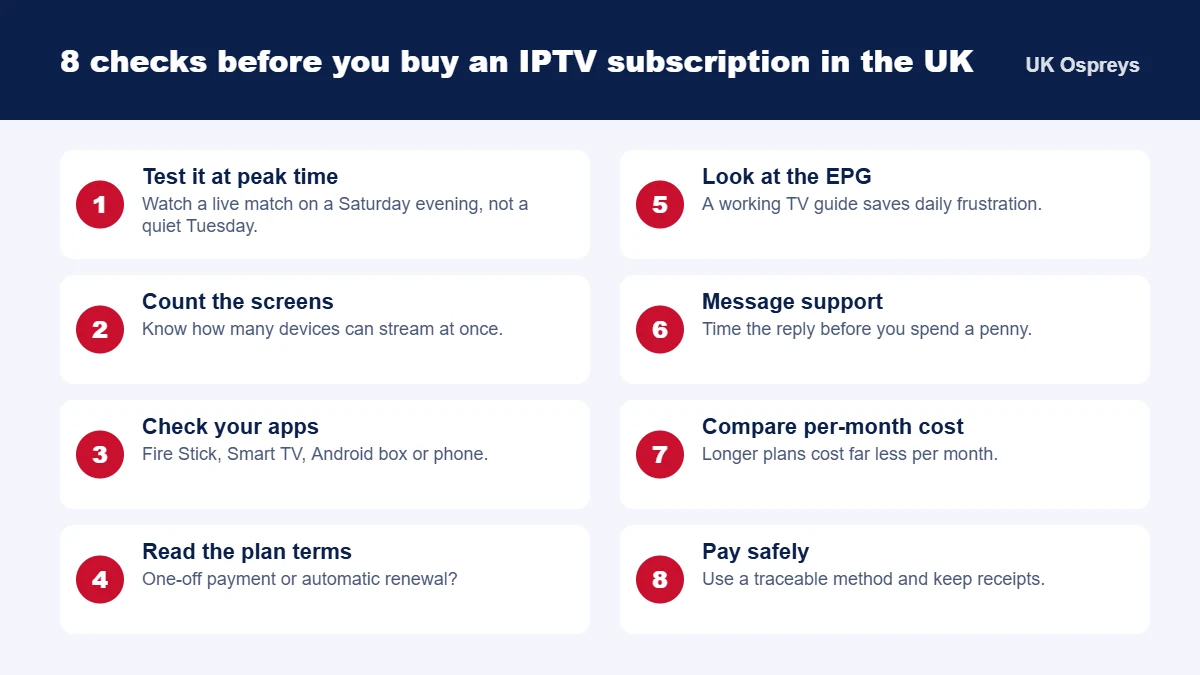
- Test it at peak time. Any service looks good on a quiet weekday afternoon. Watch a live match on a Saturday evening.
- Count the screens. Find out how many devices can stream at once if more than one person watches.
- Check your apps and devices. Make sure the service works on what you already own.
- Read the plan terms. One-off payment or automatic renewal? What happens if it does not work on your TV?
- Look at the EPG. A guide that matches what is actually on screen makes everyday use far easier.
- Message support before buying. Time the reply. Minutes is good; days is a warning.
- Compare cost per month, not headline price. A cheap one-month plan can cost more over a year than a 12-month plan.
- Pay safely. Use a traceable payment method and keep your confirmation.
Our guide on how to choose the best IPTV providers goes deeper on comparing sellers.
Devices and broadband: what you need at home
You do not need special equipment. Most UK households already own something that works:
| Device | Why people choose it |
|---|---|
| Amazon Fire Stick | Cheap, plugs into any TV with HDMI, very popular |
| Smart TV (Samsung, LG, Android TV) | No extra box, just install a player app |
| Android TV box | Fast and flexible, good for 4K |
| Phone, tablet or laptop | Watch in another room or while travelling |
For broadband, aim for about 15 Mbps for HD and 25 Mbps or more for 4K. A wired Ethernet connection or a good Wi-Fi signal near the TV makes a noticeable difference during live sport. Step-by-step instructions are in our guide to setting up British IPTV on any device, and sports fans should read the best British IPTV for live sport.
Red flags to watch for
- “Lifetime” access for a single small payment.
- No terms and conditions, no contact details and no way to ask questions before paying.
- A request for card details to start a “free” test.
- Pressure to buy a long plan immediately without trying the service.
- Instructions to install unknown files instead of apps from official stores.
Safe and legal viewing
Use apps from official app stores, keep your login details to yourself and pay with a method that leaves a record. Make sure the way you watch complies with the rules that apply to you in the UK. Our article on British IPTV and the law explains the key points, and our terms and conditions set out how our service works.
IPTV subscription UK: frequently asked questions
How much does an IPTV subscription cost in the UK?
At UK Ospreys plans start at €14.99 for one month (roughly £13) and drop to about €3.75 a month on the 12-month plan at €44.99. Prices are one-off payments, with no contract and no monthly direct debit.
Is a monthly or yearly IPTV subscription better?
Start with one month if you have never used the service before. Once you are happy with picture quality and support, a 6 or 12-month plan is far cheaper per month and saves you renewing every few weeks.
What do I need to use an IPTV subscription in the UK?
A broadband connection of around 15 Mbps for HD (25 Mbps or more for 4K), a compatible device such as an Amazon Fire Stick, Smart TV, Android box or phone, and a player app. Your login details arrive by WhatsApp after you order.
Can I use one IPTV subscription on several TVs?
It depends on the plan. Ask how many screens can stream at the same time before you buy, so the whole household is covered.
Does an IPTV subscription renew automatically?
Our plans are one-off payments and do not renew on their own. You choose when, and whether, to renew.
The bottom line
A good IPTV subscription in the UK should be easy to set up, stable when the whole country is watching the same match, honest about price and backed by support that actually replies. Start with a short plan, test it properly, then switch to a longer plan to get the lowest monthly cost.
Not sure which plan suits your household? Message us on WhatsApp or use our contact page, and we will help you choose.